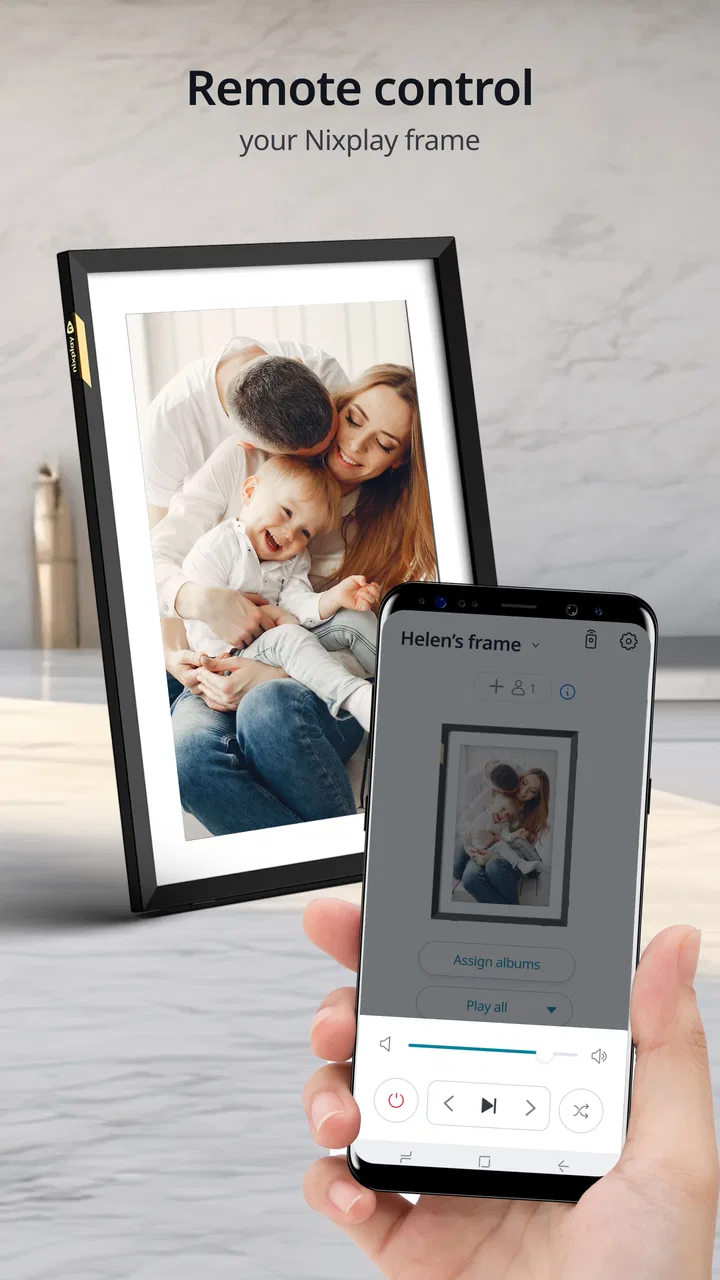
Nixplay App
- 2.2
- Rating
- 1.00M
- Installs
- Free
- Price

 Analysis by App-foxy
I approached Nixplay App as a practical photography tool rather than another place to browse or edit images. Its purpose is quite focused: move photos from a phone to a Nixplay WiFi Frame so they can appear on a dedicated screen. That narrow job is also its main appeal. Instead of leaving family pictures inside a camera roll, cloud folder, or social feed, I could use the app as the handoff point between taking a photo and seeing it displayed in the room.
That makes the starting condition important. This is not the app I would choose if I only wanted filters, collages, manual adjustments, or a general photo backup service. It is designed for people who already have, or are planning to use, compatible Nixplay hardware. The developer is Nixplay, and the app sits in the photography category, but its real identity is closer to a companion for a connected frame than a complete photo studio.
I also think it helps to set expectations before installing it. The app is free to download, has an Everyone age rating, and has been available since Aug 13, 2015. Its current version is 3.74.2 and it requires Android 7.0 or later. Optional purchases range from $1.99 to $34.99 per item, so I would check which parts of the wider Nixplay experience are relevant to me before assuming that every useful function is included without additional cost.
You May Also Like

 Blood Strike: 2.5 Anniversary
Blood Strike’s Loadouts Turn Every Drop Into a Tactical Gamble
A close look at Blood Strike’s custom loadouts: how fast access to signature weapons reshapes its battle royale rhythm, rewards preparation, and narrows the gap between fights.

 Pandora - Music & Podcasts
Pandora’s Music Is Easy to Start, but Harder to Recover
Pandora’s strength is its low-effort path from a seed to a station. Its weak spot is how much confidence it asks you to place in connection, setup, and quiet recovery.

 8 Ball Pool
 Is Built on Rivalries, Rematches, and Routine
A close look at the rivalries, rematches, shared routines, and unanswered safety questions that turn a quick pool match into a persistent mobile community.

 Samsung Music
’s Quiet Strength Is Playing What You Already Own
Its reach comes less from spectacle than from dependable access to a personal library. That simplicity is both the app’s strongest retention engine and its ceiling.

 AccuWeather: Weather Radar
AccuWeather Review: A Quick, Clear Forecast for Everyday Decisions
For everyday plans, the best forecast is the one you can understand quickly. AccuWeather makes rain timing, radar, and local conditions easy to act on, with a few trade-offs.

 Hill Climb Racing
Why Hill Climb Racing Still Turns Crashes Into One More Run
A tiny car, a bumpy hill and one more upgrade: Hill Climb Racing keeps resurfacing because its simple chaos makes every near-miss feel personal.
More From Our News Desk



From a phone photo to a frame on the wall
I find the most useful way to judge this section is to separate choosing a photo from getting it onto the frame. A quick check of the image’s crop and audience can save a second transfer and help the display feel intentional, especially in a shared room. Next, I’ll look at what changes when this simple handoff becomes part of a household’s regular photo routine.
The starting point: choosing the right reason to use it
My first useful test was not simply sending a random image. I chose the kind of photo that benefits from being visible without anyone opening an app: a family moment, a travel picture, or an image that someone in another room might enjoy seeing during the day. That is where this app makes sense. It turns a private phone habit into a shared display routine.
For a household, the value is less about one impressive upload and more about removing the small barrier between “I should share this” and actually sharing it. A relative can receive a new picture on a frame instead of needing to check a messaging thread. A parent can keep a rotating selection of recent memories in view. Someone working from home can use a frame as a quiet visual reminder of people and places that matter to them.
There is a useful trade-off here. The app is more intentional than sending an image through a chat, but less flexible than a full cloud photo library. A message is better when I need conversation, captions, or an immediate reply. A cloud album is better when several people need to search and organize a large collection. Nixplay App is strongest when the desired outcome is simply: “put this picture on that connected frame.”
Preparing the image before sending it
One practical habit improved the experience for me: I looked at the image on the phone before transferring it, paying attention to the crop and the subject’s position. A photograph that looks balanced in a portrait-oriented camera roll may feel awkward on a landscape display. Faces close to the edge, small subjects, and wide empty areas can become more noticeable once the image is shown at room scale.
This is an easy step to overlook because the app’s central task feels immediate. However, the best result often comes from selecting a picture that already has a clear focal point. If I wanted a particular crop, I prepared that image first in the phone’s normal photo editor, then used the Nixplay workflow for delivery. That division of labor is sensible: the phone handles editing, while the frame companion handles getting the finished image where it needs to go.
I would not treat the app as a replacement for a dedicated editor. Its usefulness begins after I have decided which photo is ready to display. That keeps the process simple, but it also means users expecting creative controls may find the experience too limited.
Moving through the app instead of the camera roll
The central flow is straightforward in concept: open the app, select the photo, choose the connected Nixplay destination, and send it for display. The important mental shift is that the destination matters as much as the image. I am not merely saving a file; I am directing it toward a particular screen that other people may see.
That changes how I select photos. In a messaging app, I might send several images quickly because the recipient can scroll past them. On a frame, every image has more visual responsibility. I found it better to choose fewer, stronger pictures rather than treat the display as a dumping ground for every recent snapshot.
The most useful workflow is to curate before transferring, not after the frame becomes cluttered. This sounds simple, but it prevents a common problem with connected displays: the technical handoff works, yet the final result feels untidy because too many similar images were added without a clear purpose.
The first handoff: phone to Nixplay service
The first handoff is from the phone to the Nixplay system. This is where the app earns its place. Instead of asking me to manually copy files to removable storage or manage a separate transfer method, it provides a dedicated route for sending images toward the frame.
That convenience is especially noticeable in a family setting. A person who is comfortable taking photos but not comfortable managing folders can still participate in updating the display. The app’s focused design reduces the number of decisions compared with a general-purpose file transfer process.
At the same time, this convenience depends on the connected Nixplay setup being ready. The app is not a universal wireless display tool for any television or digital frame. Its role is tied to Nixplay WiFi Frame hardware. If I did not own compatible hardware, installing the app alone would not give me a meaningful photo-display experience.
This is the first question I would answer before downloading: do I want to send pictures to a Nixplay frame, or do I only want a way to share and store photos? If the latter is true, Google Photos, Apple Photos, a messaging service, or a normal cloud album may be a better fit because those tools solve a broader problem.
The second handoff: from the service to the physical screen
After the image leaves the phone, the experience becomes less like ordinary photo sharing. The destination is no longer another person’s inbox; it is a physical object in a room. That handoff is what makes the app distinctive, but it also introduces another point where expectations need to be realistic.
I think of the process as having three separate stages: selecting a suitable image, sending it through the app, and waiting for the connected frame to reflect the change. Keeping those stages separate helps when something feels delayed or incomplete. If the image was never selected correctly, the issue is different from a frame that has not yet reflected a successful handoff.
This way of thinking is useful for shared households. One person may choose and send the photo while another person is standing near the frame. The person at the frame can judge the final crop and visibility, while the sender can improve the source image for the next attempt. That small feedback loop is more valuable than repeatedly pressing send without checking how the result looks in the room.
A realistic everyday scenario
Imagine I am visiting relatives and take a group photo before leaving. Later, I want that picture to appear on their Nixplay frame without asking them to search through a chat conversation. I can select the image on my phone, prepare it so nobody is cut off at the edges, and send it through the app to the frame. The outcome is not just that the file reaches them; the photo becomes part of their everyday space.
That scenario shows why this app can feel more personal than a normal upload. The recipient does not have to remember to open a link. They encounter the image naturally while passing the display. For grandparents, busy families, or households that enjoy changing visual memories, that passive visibility is the real benefit.
It also shows the limitation. If the recipient needs to discuss the picture, download it, comment on it, or find it months later, a shared album or messaging thread remains more capable. Nixplay App is about presence, not conversation or archival search.
Curating for a display rather than a feed
A phone gallery rewards volume because I can swipe quickly. A frame rewards rhythm and variety. I found that alternating people, places, close details, and wider scenes makes a display feel more deliberate than sending several nearly identical shots from the same moment.
Another useful approach is to create a small selection for a specific purpose. For example, I might choose recent family photos, a set of travel memories, or images suitable for a shared living area. This keeps the frame relevant and reduces the chance that an accidental screenshot or unfinished image becomes part of the visible rotation.
The app’s focused nature makes this curation responsibility more noticeable. It does not turn every photo into a polished presentation automatically. The quality of the final experience depends heavily on the choices I make before pressing the transfer control.
What the app does well compared with usual alternatives
Compared with sending photos by text, the Nixplay route is better when the goal is continuous visibility rather than a one-time notification. Compared with posting to a social network, it is more private in spirit because the image is directed toward a household display instead of a public or semi-public feed. Compared with using a USB drive, it is more convenient for ongoing updates because I can work from the phone I already use to take pictures.
Compared with a general photo-storage app, it is more direct for the final physical outcome. I do not have to explain which folder to open or ask someone to cast the image manually. The app is built around the destination, and that focus is its clearest advantage.
But the comparison also exposes its boundaries. General photo services are usually better for search, backup, editing, and large libraries. Messaging apps are better for immediate replies. A smart television or casting tool may be better when I want to show a photo temporarily to a group. Nixplay App is the better choice only when a Nixplay WiFi Frame is the intended endpoint and a persistent display is more useful than a conversation.
Where the flow becomes less comfortable
The biggest friction is dependency. The app’s usefulness is closely connected to compatible Nixplay hardware and the handoff between the phone, the service, and the frame. If any part of that chain is unavailable or not prepared, the app cannot deliver its main outcome by itself.
I also would not recommend it to someone who wants a full photography toolbox. The store summary centers on sending photos directly to a Nixplay WiFi Frame, and that focus is accurate. Users searching for advanced retouching, camera controls, albums with deep search, or a broad social layer should look elsewhere.
The public response is another reason I would approach it with measured expectations. It has an average rating of 2.2 from around 4K ratings, with roughly 2.2K written reviews, and it has passed 1M+ installs. Those figures suggest that the app has a substantial user base but that satisfaction is mixed. I would not read the rating as proof that the core idea fails; I would read it as a reminder that connected workflows can be judged by setup, reliability, account experience, and hardware interaction as much as by the screen inside the app.
For that reason, I would test the complete path with one or two non-sensitive photos before building a large routine around it. That gives me a chance to confirm that my phone, account, frame, and preferred sharing habit work together. It is a more useful test than merely opening the app and deciding that the interface looks simple.
Privacy and household judgement
Because the destination is a visible frame, photo selection deserves more care than it might in a private gallery. I would avoid sending images that contain information I would not want displayed in a shared room, especially if guests, children, or visitors can see the screen. The app makes sharing convenient, but convenience should not replace a quick check of who can view the final result.
This is also where the difference between a personal frame and a family frame matters. A picture that is appropriate for one person’s private space may not be suitable for a common area. I found it helpful to treat every transfer as a small publishing decision: check the people in the image, the background, and whether the photo still feels right outside the context in which it was taken.
Who should use it and who should skip it
I would recommend Nixplay App to someone who owns a Nixplay WiFi Frame and wants an uncomplicated way to keep it feeling current. It is particularly appealing for families sharing everyday memories, people who prefer physical displays to phone galleries, and anyone who wants relatives to see new photos without requiring them to open a message or album.
I would be more cautious if I were buying a frame solely because I wanted an inexpensive digital photo viewer with no connected ecosystem. In that case, a local-storage frame may be simpler. I would also skip this app if my main requirement were editing, organizing a professional archive, or collaborating around comments and albums. The dedicated workflow is a strength only when it matches the desired outcome.
The optional purchase range, from $1.99 to $34.99 per item, is another reason to decide what I actually need before spending money inside the wider experience. The free app is enough to evaluate whether the phone-to-frame concept suits me, but I would avoid assuming that every possible convenience belongs to the basic download.
My final view after following the whole route
After looking at the complete journey from choosing a photo to seeing it on a physical display, I see Nixplay App as a specialized bridge rather than a general photography app. Its best quality is clarity of purpose: it helps turn a phone image into something visible in a shared space. That can be genuinely meaningful, especially when the recipient is unlikely to browse a digital album regularly.
Its weaknesses come from the same focus. The app is not designed to replace a camera editor, cloud library, messaging service, or universal casting tool. The hardware connection and the quality of the selected images both matter, and the mixed average rating means I would verify the full workflow before depending on it heavily.
Still, if I already have the right Nixplay frame, I think the app is worth trying because it addresses a specific everyday problem well: getting a good photo out of the phone and into the room where people can actually notice it. Choose it for the display outcome, not for features it was never meant to provide. For that audience, it can make sharing feel more natural; for everyone else, a broader photo service will probably be the more sensible choice.
FAQs for Nixplay App
01What is the Nixplay App used for?
The Nixplay App is designed to manage and share photos and videos on compatible Nixplay digital photo frames. After signing in, you can upload images from your phone, organize them into playlists, and send content to one or more connected frames. It is especially useful for families who want to display new memories remotely without manually transferring files to a memory card or USB drive.
02Do I need a Nixplay frame to use the app?
The app is primarily built for controlling Nixplay digital frames, so its main features are most useful when you own a compatible device. You may be able to browse, organize, and prepare photos within your account, but the complete experience involves sending content to a connected frame. Before downloading, check the frame model, regional availability, and account requirements to confirm compatibility.
03How do I upload and display photos with Nixplay?
Once you log in, the Nixplay App generally lets you select photos and videos from your phone, create playlists, and assign them to a connected frame. The frame needs an active internet connection to receive updates. Upload times can vary depending on file size and connection quality, while supported formats, video duration, storage limits, and playlist options may depend on your Nixplay plan and device model.
04Is the Nixplay App free, or does it require a subscription?
Nixplay may offer basic functionality through an account, but some advanced features can depend on the frame model, region, or a paid subscription. Possible limitations may involve cloud storage, playlist management, sharing options, or additional family and organizational tools. Review the current pricing and subscription terms in the official app store before committing, since plans and included features can change.
05Are my photos and personal data safe in the Nixplay App?
The Nixplay App requires an account and internet connectivity, meaning uploaded photos and related information may be processed through cloud services. Use a strong, unique password and enable any available security options. You should also carefully review sharing permissions before inviting family members or other users. For private images, read Nixplay’s current privacy policy and understand how content is stored, shared, and deleted.
Pros
- Easy setup with clear instructions for connecting compatible displays.
- Supports remote photo and video management from anywhere.
- Useful scheduling tools for automatically changing playlists.
- Private sharing options help control who can view uploaded content.
- Works well for rotating family memories
- artwork
- or business visuals.
Cons
- Requires a compatible Nixplay frame or display to be useful.
- Some advanced features may require a paid subscription.
- Performance depends on a stable internet connection.
- Large media libraries can take time to upload and organize.
- Background playback may consume noticeable battery on mobile devices.

Nixplay App
Gallery